子ページから親ページを参照
親ページと子ページがある場合、子ページがiframe要素として作成されることが多いです。しかし、作成途上ではそれぞれ独立してローカル環境で作られます。よって子ページには親ページが存在しない状態であり完成時と異なる動作になります。
次の図に示すように子ページの動作で親ページの存在で自動的にその状態を反映させる結果を表示させることができました。
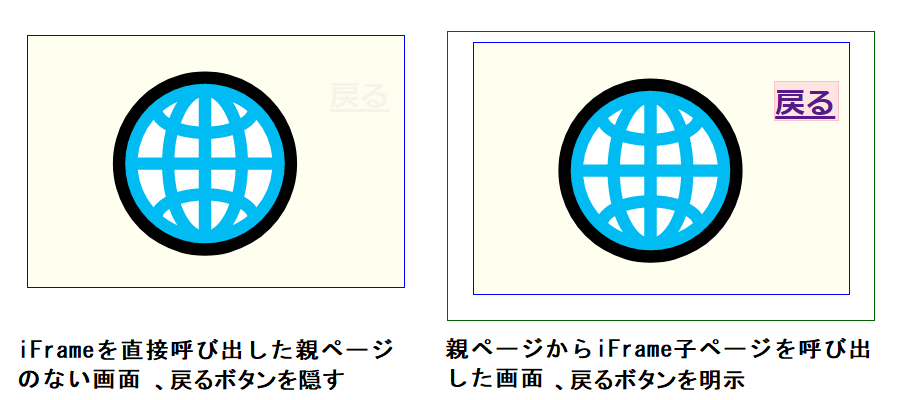
動作例
iFrameへのボタンをクリックすれば子ページに制御が移ります。子ページでは親ページから呼び出されたどうかを独自で判断し適切な表示が行われます。
動作コード
親ページコード
<html>
<head>
  <meta charset="UTF-8">
</head>
<body onload="">
<Div id="head0" style="position:relative; width:400px; height:280px; margin:0 auto; background:aliceblue; display:block; border:1px solid navy;">
   <div style="width:300px; height:200px; margin:0 auto; border:0px solid orange;">
	<a id="a3" style=" position:absolute; top:50%; left:50%; margin-right:-50%; transform:translate(-50%, -50%); width:260px; height:60px; text-decoration:underline; font-size:56px; color:darkgreen;" href="javascript:void(0)" onclick="startBack(0);">iFrameへ</a>
   </div>
</Div>
<iframe id="head1" style="width:340px; height:230px; margin:0 auto; display:none; border:0px solid darkgreen;" src="https://aidesign.lolipop.jp/wp-content/uploads/2022/06/iFrameChild.html" frameborder="0"></iframe>
<script type="text/javascript">
window.addEventListener('message', event => {		//ロード時、解説ボタンが押されたとき、戻るボタンが押されたとき
	wrk = event.data.replace(/\n/g, '');			//wrk:改行を削除した文字列, グローバル変数
	var letter8=wrk.substr(0, 8);					//先頭から8文字
	console.log("MESSAGE", letter8);
	startBack(1);									//解説ボタンが押されたとき
});
function startBack(n){					//クリック起動関数 解説		//n  head0 head1 message
	document.getElementById("head"+n).style.display="none";			//0  head0 head1 start3
	document.getElementById("head"+(1-n)).style.display="block";	//1  head1 head0 goback
	console.log(n, n?"goback":"start3", document.getElementById("head0").style.display, document.getElementById("head1").style.display);
}
</script>
</body>
</html>
子ページコード
<head><meta charset="UTF-8"></head>
<Div id="ms" style="width:300px; height:200px; position:relative; margin:0 auto; background:ivory; border:0px solid blue;">
<a id="toparent" style="position:absolute; left:240px; top:30px; width:50px; height:30px; background:mistyrose; font-size:24px; font-weight:bold; border:1px solid pink; opacity:1.0;" href="#" onclick="window.parent.postMessage('describe', '*');">戻る</a>
<div style="position:absolute; left:50px; top:0px; font-size:140px;">🌐</div>
</Div>
<script type="text/javascript" charset="utf-8">
var a=window.self; //self
var b=window.top; //parent
if(a==b) document.getElementById("toparent").style.opacity=0.05;
else window.parent.postMessage('describe', '*');
</script>
補足事項
子ページコードをコピーしてローカル環境上にhtmlの拡張子を持つファイル名にて保存し実行させると最上部図の左に示すように戻るボタンが薄く表示されるでしょう。子ページコードの7~9行の処理『2つのオブジェクトが同一であれば親ページが無い』ことになります。
10行目以下に子ページとしての処理が定義されますが、このような仕掛けを一度、作っておくとテスト用、アップロード用と2つのコードを用意する必要がなくなり、神経を使わずに済みます。